
RxLocal
PioneerRx, LLCMedical
4.64.47K Reviews
- Version
- 7.0.0
- Installs
- 500.00K
- Age Rating
- Everyone
Screenshots
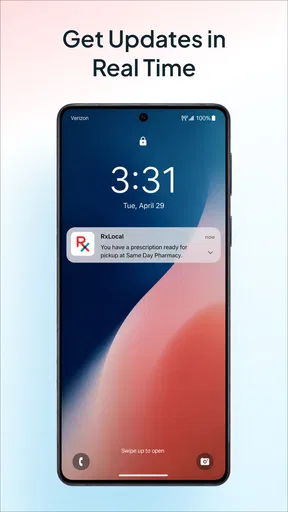
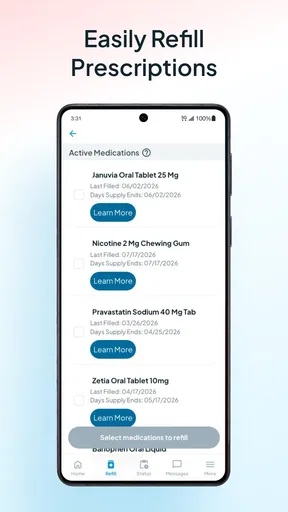
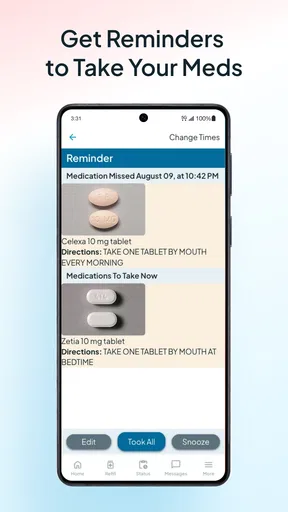
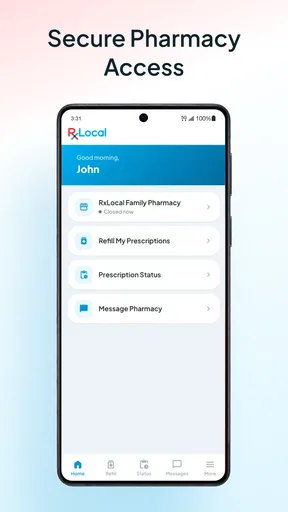
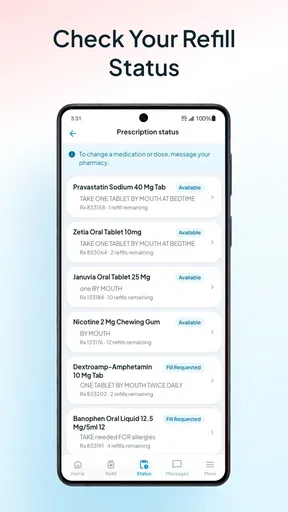
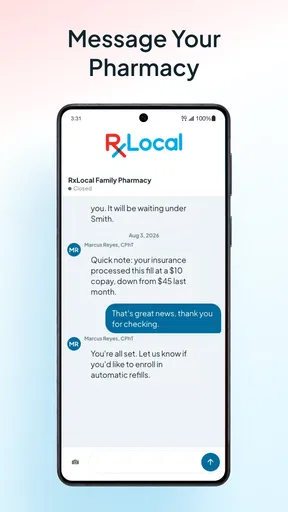
Our Review of RxLocal
 Analysis by Appyee
When a prescription needs attention, the hardest part is often not the medicine itself but the small chain of calls, waiting, and repeated explanations around it. RxLocal takes aim at that routine by giving me a way to request refills and message my pharmacy from a phone. I found it most useful when I already knew which pharmacy handled my prescription and wanted to avoid a simple phone call, rather than when I needed broad medical advice or a new treatment plan.
This is a free medical app from PioneerRx, LLC, with an Everyone age rating. It has been available since August 7, 2012, and the current version is 6.2.1, requiring at least iOS 11 or the corresponding supported mobile environment. Its audience is clear: people who want a more direct connection with their pharmacy for routine prescription tasks. It is not trying to replace a doctor, diagnose symptoms, or act as a full health-record system.
From realizing you need medicine to knowing what happens next
I find the most useful way to judge a pharmacy app is to follow the task from the moment I notice a prescription needs attention to the point when I understand what to do next. That means looking not only at how a request begins, but also at the handoff and the limits of waiting for a written reply. A clear view of that sequence helps me decide when this kind of tool is convenient—and when a direct call is wiser.
Starting with the everyday problem
A realistic use case is easy to picture. I notice that a regular prescription is running low while I am away from home, at work, or simply trying to organize the week. Calling the pharmacy would probably solve it, but it also means finding the number, waiting for the right department, and explaining the request aloud. With RxLocal, the starting point is the app rather than the telephone.
That change sounds modest, but it matters for people who dislike phone calls, have difficulty hearing automated menus, or want to send a request when the pharmacy is busy. The app’s store summary focuses on skipping the call and handling refills and messages, and that matches its strongest practical role. It is a communication shortcut, not a replacement for the pharmacist’s judgment.
The first thing I would suggest is setting expectations before using it. RxLocal works best when the pharmacy is part of the workflow the app supports. If your prescription is held by a different pharmacy, or if you are trying to transfer medication between locations, the app may not remove every step. The convenience comes from connecting with your existing pharmacy, not from creating a universal prescription network.
Setting up the right pharmacy relationship
The useful outcome depends on getting the pharmacy connection right. A refill request is only helpful if it reaches the location that actually has your prescription record. I would take a moment to check the pharmacy identity and the medication details before sending anything, especially if family members share a device or if several prescriptions have similar names.
This is one of the less obvious parts of the experience: the app can reduce communication effort, but it does not eliminate the need for personal accuracy. A mistaken selection at the beginning can create more work later. The best habit is to treat the first setup as an administrative check, not as a screen to rush through.
For someone managing medicine for a parent or another family member, that distinction is important. The app may make the message easier to send, but the person using it still needs to know whose prescription is being discussed and which pharmacy should receive the request. I would not assume that convenience automatically means the app can manage every household member in the same way.
Choosing a refill instead of sending a general message
Once the pharmacy connection is ready, the next decision is whether the need is a routine refill or a question that deserves a message. For a known prescription, a refill request is the cleaner path. It gives the pharmacy a specific task and avoids filling the message with information that is already available in the prescription record.
For anything unusual, I would use the messaging side instead. Examples include asking whether a prescription is ready, explaining that a pickup plan has changed, or checking a detail that does not fit neatly into a refill request. This is where RxLocal feels more useful than a basic reminder app: it connects the reminder in my head with the pharmacy that can act on it.
There is a trade-off, though. A message is not the same as a live conversation. If the question is urgent, involves a serious reaction, or requires immediate clarification about how to take medicine, I would contact the pharmacy directly or seek appropriate medical help rather than wait for an in-app response. The app is strongest for ordinary coordination, not time-critical care.
Reviewing the request before sending it
I consider the review step essential. Before submitting, I would check the selected prescription, the pharmacy, and the wording of any note. This is especially useful when a refill is needed for a trip or a weekend, because a vague message can lead to a follow-up exchange and defeat the purpose of avoiding a call.
A practical tip is to write the message as a short handoff: identify the prescription, explain the timing issue, and state what you want the pharmacy to do. I would avoid adding unrelated medical history or sensitive details that are not needed for the request. Clear, limited messages are easier for a pharmacy team to process than long explanations.
That workflow also helps separate a refill request from a medical question. If I am asking whether a medicine interacts with something else, I would make that clear. If I only need the next refill prepared, I would keep the request focused. The app can carry the message, but the quality of the handoff still depends on how carefully it is written.
The pharmacy handoff is where the app earns its place
After submission, the request moves from my phone to the pharmacy team. This handoff is the core of RxLocal. Instead of repeatedly describing the same request over the phone, I can send it through the app and let the pharmacy handle the prescription-side work.
That does not mean every request is instantly completed. The pharmacy may need to review the prescription, confirm information, or deal with an issue that cannot be resolved automatically. I see the app as a cleaner starting point for the conversation, not a promise that the pharmacy process itself disappears.
This distinction is important for people who expect an app to show a complete, real-time picture of stock, insurance approval, or pickup timing. Those matters can depend on the pharmacy and the prescription. RxLocal’s value is in initiating contact and reducing unnecessary calling; it should not be treated as an independent authority on whether medicine is clinically appropriate or definitely ready.
What the result feels like in daily use
When the request is straightforward, the result is a calmer routine. I can send the refill request, keep the interaction in one place, and wait for the pharmacy to process it instead of starting with a phone queue. That is particularly helpful for recurring prescriptions, where the action itself is familiar and the main problem is remembering to initiate it.
The app also makes sense for people who prefer written communication. A message creates a more deliberate exchange than trying to remember every detail during a short call. For a person who is juggling work, children, transportation, or several appointments, that flexibility can be more valuable than flashy features.
RxLocal has earned a 4.7 average from around 20 thousand ratings, with roughly 4.1 thousand written reviews, and it has passed 500 thousand installs. Those figures suggest that the simple pharmacy-communication idea resonates with a substantial audience. I would still judge it by the pharmacy relationship first, because a highly rated app cannot compensate for a pharmacy that does not support the expected workflow.
Using it as part of a medication routine
The most useful advanced habit is to make the app part of a repeatable schedule rather than waiting until the last possible moment. I would open it when I review the week, identify prescriptions that need attention, and send requests early enough for the pharmacy to handle normal questions or delays.
This is not about inventing a complicated medication-management system inside the app. It is about using its communication function at the right point in the larger routine. A calendar reminder can tell me to check RxLocal, while RxLocal handles the actual handoff to the pharmacy. Keeping those roles separate prevents me from assuming that a refill request is the same thing as a dose reminder.
Another useful approach is to use messages for exceptions, not for every ordinary refill. If I send a long note every time, the channel becomes cluttered. If I reserve it for timing changes, clarification, or a pharmacy question, the written conversation remains easier to understand. That small discipline improves the experience without requiring any special technical knowledge.
Where the flow breaks
The first likely break is a pharmacy mismatch. If the app does not connect me to the pharmacy that holds the prescription, I may still need to call or use another service. This is the biggest reason I would not recommend installing RxLocal blindly and expecting it to manage every prescription in my life.
The second break is urgency. A message can be convenient, but it is not the right channel for a severe side effect, a missed critical dose, or a question that needs an immediate answer. In those situations, I would contact a pharmacist, doctor, or emergency service as appropriate. The app belongs in the routine-administration part of healthcare, not the emergency part.
A third source of friction is ambiguity. If I send a request without checking the medication or explaining a deadline, the pharmacy may need to contact me again. That is not necessarily an app failure; it is a reminder that digital communication still needs the same accuracy as a phone conversation. The advantage is that I can prepare the message carefully before sending it.
There is also a limit to what I would ask the app to replace. A dedicated medication reminder may be better for alarms and dose tracking. A doctor’s patient portal may be more appropriate for test results, clinical questions, or appointment management. A direct phone call remains better when the matter is complicated or time-sensitive. RxLocal is most convincing when the task begins and ends with the pharmacy.
How it compares with the usual alternatives
Compared with calling, RxLocal is quieter and more deliberate. I do not have to repeat a prescription name over the phone, and I can compose the request when it suits me. The cost is that I lose the immediate back-and-forth of a live conversation, so a complicated request can take longer if several messages are needed.
Compared with a general health app, it is narrower but potentially more useful for this one job. A broad health platform may collect appointments, records, reminders, and wellness information, while RxLocal focuses on the pharmacy exchange. I prefer that focused approach when I only need a refill or a pharmacy message, but I would choose the broader platform when I need a fuller view of my care.
Compared with a medication reminder, the difference is even clearer. A reminder tells me that action is due; RxLocal helps me communicate that action to the pharmacy. Using both can make sense, but neither should be mistaken for the other. The reminder supports adherence, while the pharmacy app supports fulfillment and questions.
Who should use it, and who should skip it
I think RxLocal is a good fit for people with recurring prescriptions, a known participating pharmacy relationship, and a preference for written requests. It is also appealing for anyone who regularly postpones a refill call because the task feels minor but inconvenient. In that situation, removing the call can make the difference between handling the refill early and leaving it until the last minute.
I would be more cautious recommending it to someone who changes pharmacies often, needs extensive medication tracking, or expects one app to coordinate doctors, insurance, appointments, and prescriptions. The narrow focus is a strength when it matches the need, but it becomes a limitation when the user wants a complete healthcare dashboard.
People who are uncomfortable reviewing prescription details on a small screen may also prefer calling. A pharmacist can ask clarifying questions immediately, while an app requires me to notice and describe the issue accurately. Accessibility and personal confidence matter more here than the app’s low cost, since free does not automatically mean effortless for every user.
My final take on the workflow
After following the process from a low prescription supply through the pharmacy handoff, I see RxLocal as a practical tool with a deliberately limited job. It helps turn “I need to deal with my refill” into a concrete request sent to the right kind of professional. That is valuable precisely because it does not pretend to be a doctor, a reminder system, or a complete medical record.
The app is free, carries an Everyone rating, and comes from PioneerRx, LLC. Its long availability and current 6.2.1 release show an established product rather than a brand-new experiment, while the strong user response makes it worth considering for routine pharmacy communication. I would begin by confirming that my pharmacy fits the workflow, then test it with a simple, non-urgent refill.
My recommendation is straightforward: choose RxLocal if your main goal is to refill and message a connected pharmacy without making a routine call. Keep a direct phone option for urgent or complicated matters, and use a separate reminder or healthcare portal when you need functions beyond the pharmacy conversation. Used within those boundaries, it can remove a surprisingly annoying step from everyday medication management.
Privacy and Permissions
See what permissions an app requests and how it handles your data.
- Contacts
- read your contacts, modify your contacts
- Location
- approximate location (network-based), precise location (GPS and network-based)
- Photos/Media/Files
- read the contents of your USB storage, modify or delete the contents of your USB storage
- Storage
- read the contents of your USB storage, modify or delete the contents of your USB storage
- Camera
- take pictures and videos
- Microphone
- record audio
- Wi-Fi connection information
- view Wi-Fi connections
- Other
- view network connections, full network access, change your audio settings, run at startup, prevent device from sleeping
Verdict
Strengths of RxLocal
- Quickly find nearby pharmacies and compare local options.
- Useful for managing prescription refills from your phone.
- Helps connect users with participating independent pharmacies.
- Can reduce unnecessary trips by showing pharmacy details in advance.
- Simple interface makes essential pharmacy information easy to access.
Limitations of RxLocal
- Features may vary depending on whether your pharmacy supports RxLocal.
- Prescription requests can be delayed by pharmacy processing times.
- Some locations may have limited information or outdated opening hours.
- Requires sharing personal and prescription-related data with the service.
- Not all pharmacy services are available through the mobile app.
Similar Picks in This Category
View All
WebMD: Symptom Checker
WebMD, LLC4.1

Microphone Amplifier
DOSA Apps4.2

Anatomy Learning - 3D Anatomy
3D Medical OU4.5

Period Tracker and Calendar
SimpleInnovation4.9

GoodRx: Prescription Coupons
GoodRx4.8

CVS Health
CVS Pharmacy4.5
Frequently Asked Questions
What is RxLocal, and what can I use it for?
RxLocal is a pharmacy-focused mobile app that helps you manage prescriptions and communicate with participating pharmacies. Depending on the pharmacy’s available services, you may be able to request refills, review prescription information, receive medication reminders, check order status, and contact pharmacy staff. The exact features can vary, so availability depends on your pharmacy and location.
Can I use RxLocal with any pharmacy or prescription?
RxLocal is generally designed to work with pharmacies that use or support the RxLocal platform, rather than with every pharmacy automatically. During setup, you typically need to select or connect with your pharmacy and provide identifying information requested by the app. Some prescriptions may not appear immediately, particularly if they are inactive, recently transferred, restricted, or not yet synchronized.
Can I request prescription refills through RxLocal?
In many cases, RxLocal lets you submit refill requests directly from the app, which can save time compared with calling the pharmacy. However, sending a request does not guarantee that the prescription can be filled immediately. The pharmacy may need to verify remaining refills, insurance coverage, stock, prescriber authorization, or legal restrictions before approving the order.
Does RxLocal provide medication reminders and refill notifications?
RxLocal may offer reminders and notifications for medications, refill availability, prescription updates, or pharmacy messages, depending on the version of the app and the services enabled by your pharmacy. You must allow notifications and keep your medication details accurate for these tools to be useful. These reminders should support, not replace, advice from a healthcare professional.
Is RxLocal safe for managing personal health information?
RxLocal handles sensitive prescription and pharmacy-related information, so users should review its privacy policy, permissions, and account-security options before using it. Choose a strong, unique password, protect your phone with a screen lock, and avoid sharing login details. For urgent medical concerns, side effects, or changes to treatment, contact a qualified healthcare professional directly.
